 HiWhiteboard
Start, Stop, Continue retrospective template
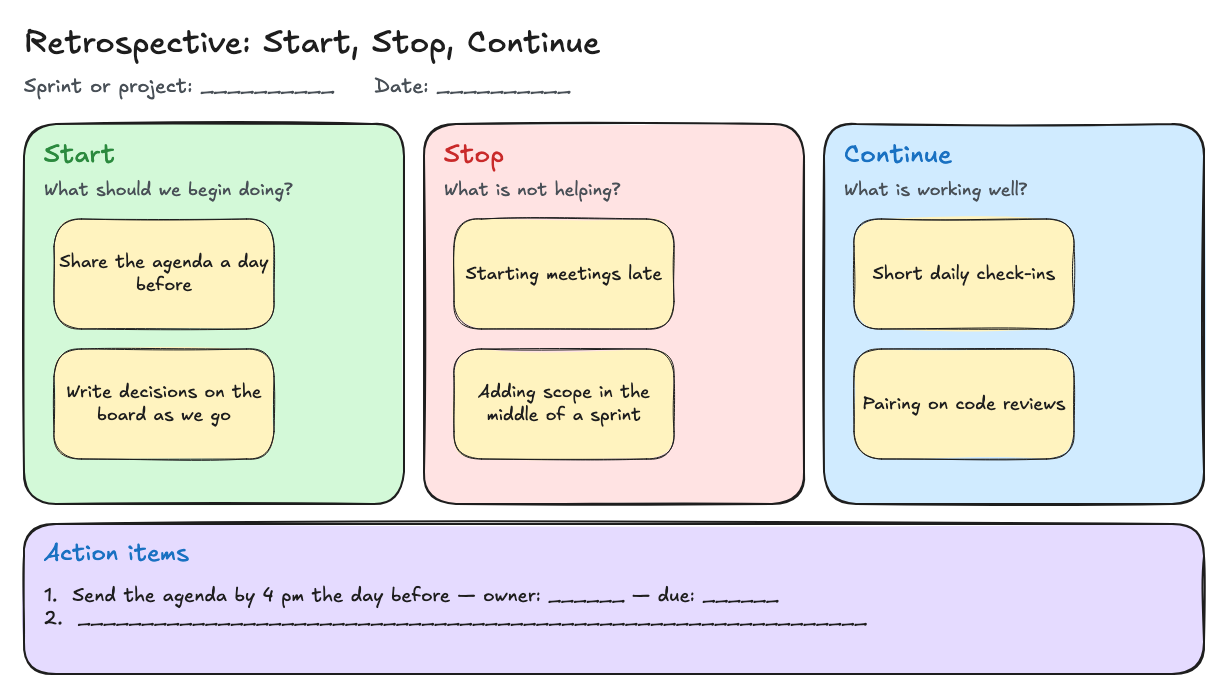
This Start, Stop, Continue retrospective template gives a facilitator three colored sections with example sticky notes and an action items area. Use it to record what the team agreed during a meeting, then export the board and share the result.
Best for: Team leads, scrum masters, and project owners who run a short retrospective and want a clean record of the outcome.
Opens in the whiteboard as a new board saved in this browser.
What you get
- Start, Stop, and Continue sections with two example notes each
- An action items box for owners and dates
- A board you can export and share after the meeting
What it does not do
- Participants cannot add notes or vote at the same time
- No anonymous input or timers
- One facilitator edits while presenting
What is in the template
- Start (green) — what the team should begin doing. Examples: Share the agenda a day before; Write decisions on the board as we go.
- Stop (red) — what is not helping. Examples: Starting meetings late; Adding scope in the middle of a sprint.
- Continue (blue) — what is working. Examples: Short daily check-ins; Pairing on code reviews.
- Action items — a box for each agreed action with an owner and a due date.
How to run a retrospective with it
- Select Use this template and rename the board with the sprint or project name.
- Share your screen in the meeting so everyone can see the board.
- Ask each person for one Start, Stop, or Continue item. Type it onto a sticky note (duplicate an example note with Ctrl/Cmd+D and edit the text).
- Group similar notes and agree on one or two actions. Write them in Action items with an owner and date.
- Export a PNG for the meeting notes, and keep an editable file if you want to compare next time.
How it supports remote brainstorming
The structure does the work: three questions keep the conversation focused, and writing notes where everyone can see them makes decisions explicit. In HiWhiteboard one facilitator edits while presenting; participants speak, and the facilitator records. There is no simultaneous editing, voting, or anonymous input — if your team needs those, use a collaborative tool.
Questions
Can participants add their own notes?
Not directly on your board. They can tell the facilitator, or each person can open their own copy and send you an exported image or backup file.
Can I reuse the board next sprint?
Yes. Use My boards → Duplicate, clear the notes, and keep last sprint’s actions visible for follow-up.
How can a digital whiteboard support remote brainstorming?
A whiteboard can give a discussion a visible structure: group ideas, label decisions, and record next steps. In HiWhiteboard, one facilitator can edit while presenting the screen and collecting spoken feedback. The retrospective template provides Start, Stop, and Continue sections; participants cannot edit or vote on the board simultaneously.
Related
- Kanban board template — To do, Doing, and Done columns with a WIP limit of 3 on Doing.
- SWOT analysis template — Four quadrants with a worked example for a small bakery project.
- Flowchart template — Start, Draft, Review, an Approved? decision, and Publish, with a rework loop.
- Guide: Use an online whiteboard for teaching and tutoring