 HiWhiteboard
Sketch a process with a flowchart template
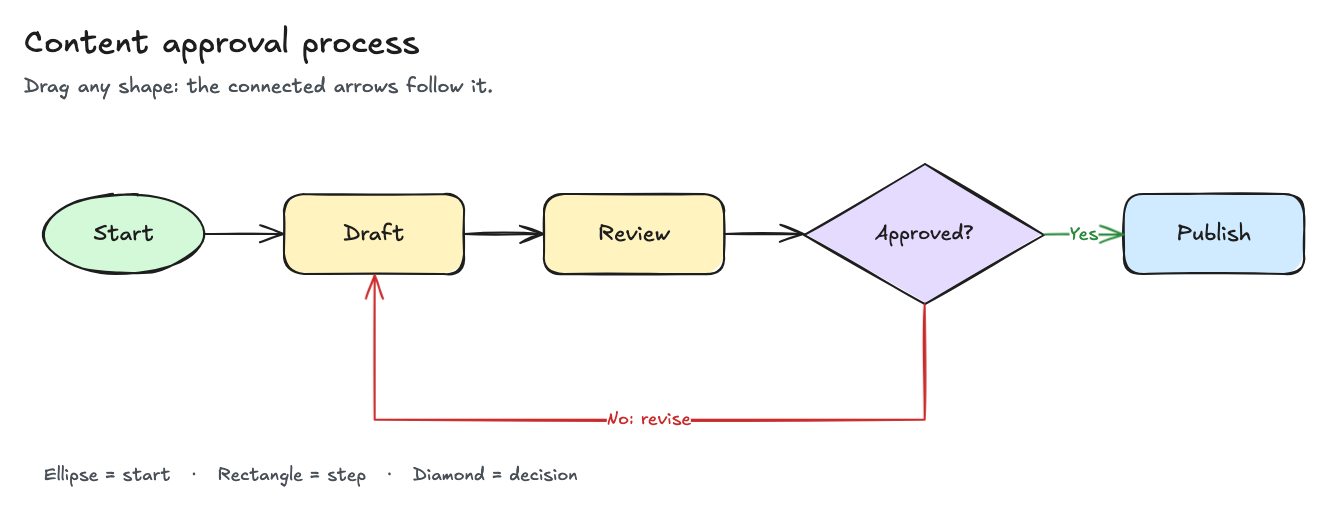
This flowchart template maps a simple approval process: Start → Draft → Review → an Approved? decision → Publish, with a No: revise arrow that loops back to Draft. The arrows are connected to the shapes, so when you move a box its arrows follow.
Best for: Anyone documenting a process with a decision point — content approvals, onboarding steps, support escalations, or homework on algorithms.
Opens in the whiteboard as a new board saved in this browser.
What you get
- Start, Draft, Review, an Approved? decision, and Publish
- Yes and No: revise arrows that stay attached when you move shapes
- A legend for the shape meanings
What it does not do
- No swimlane, org-chart, or auto-layout tools
- No export to Visio or PDF (use PNG or SVG)
Shapes used in the template
- Ellipse — the start (or end) of the process.
- Rectangle — a step someone does: Draft, Review, Publish.
- Diamond — a yes/no decision: Approved?
- Arrows — the order of steps. The decision has two labeled arrows: Yes to Publish and No: revise back to Draft.
How to edit the flow
- Select Use this template to open your own copy.
- Double-click a shape to change its text. Double-click an arrow to edit its label.
- Drag a shape to a new position; the connected arrows stay attached and reroute.
- To add a step, draw a rectangle, then draw an arrow starting on one shape and ending on another so it binds to both.
- Export a PNG or SVG when the process is ready to share, and keep the editable file for future changes.
Tips for clear flowcharts
- Use one verb per step (“Review”, not “Review stuff and send”).
- Every decision needs at least two labeled exits.
- Keep the main path in a straight line and put loops below it, as the rework arrow does here.
Questions
Can I make a swimlane or organization chart?
You can draw lanes with rectangles and text, but there are no dedicated swimlane or org-chart tools.
Can I export to Visio or PDF?
No. You can export PNG, SVG, or the editable .excalidraw file. To get a PDF, print the exported image from your system’s image viewer if it offers Save as PDF.
Related
- SWOT analysis template — Four quadrants with a worked example for a small bakery project.
- Kanban board template — To do, Doing, and Done columns with a WIP limit of 3 on Doing.
- Classroom whiteboard template — Topic and date header, a working area, key points, and practice questions.
- Guide: How to save, export, and back up a whiteboard