 HiWhiteboard
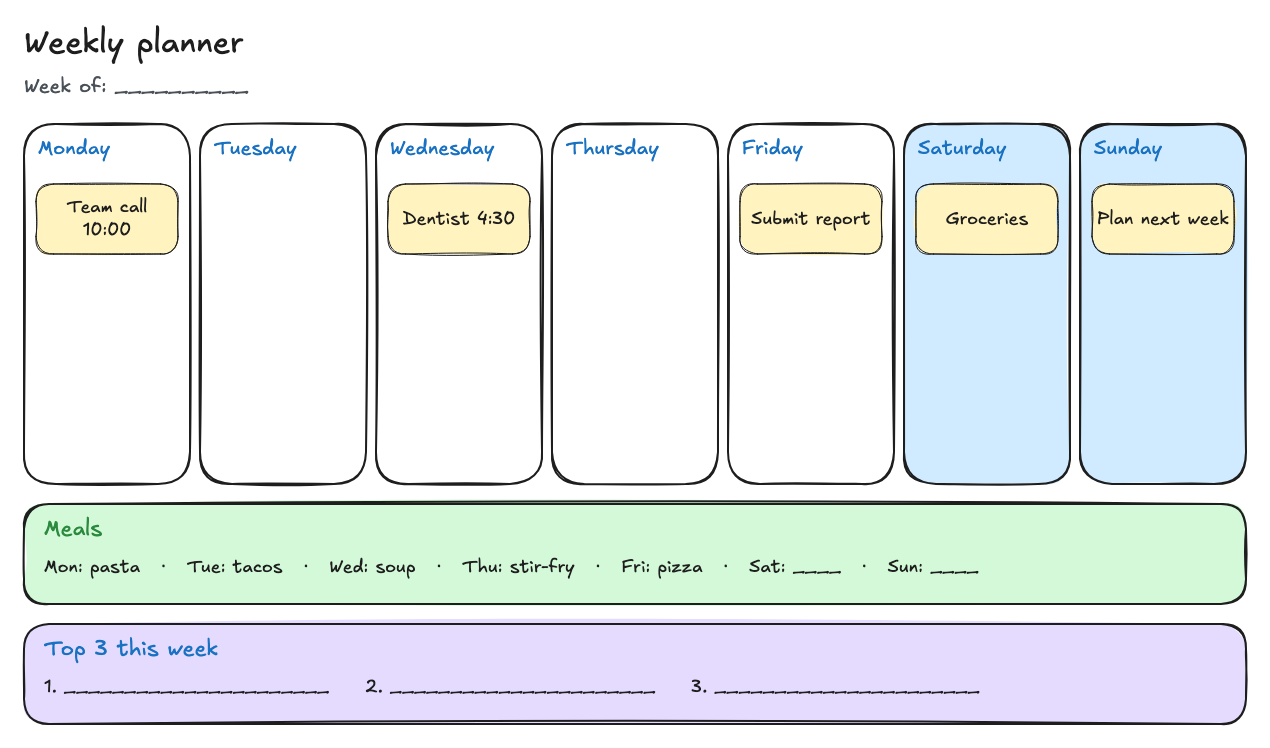
A weekly planner on a whiteboard
This weekly planner whiteboard gives you one column for each day from Monday to Sunday, a meals row, and a box for your top three priorities. Plan the week in your browser, move notes between days as plans change, and save a picture of it. No sign-up.
Best for: Anyone planning a week at home or at work: appointments, errands, meals, and the few things that matter most.
Opens in the whiteboard as a new board saved in this browser.
What you get
- Seven day columns with example notes such as Team call 10:00 and Dentist 4:30
- A meals row for planning dinners
- A top three priorities box for the week
What it does not do
- No reminders, notifications, or calendar sync
- Notes are drawings: they do not track status like Kanban cards
- Saved only in this browser unless you export a backup
How to plan your week
- Select Use this template and write the date next to Week of.
- Fill in the Top 3 this week box first, so the big things get a day.
- Add one sticky note per appointment or task. Duplicate an example note (Ctrl/Cmd+D), drag it to a day, and double-click to edit the text.
- Plan meals in the green row.
- When plans change, drag the note to another day. At the end of the week, export a PNG for your records and duplicate the board for next week.
Planner or Kanban?
Use this planner when when matters: appointments, deadlines on specific days, and meals. If you mostly care about what stage each task is in, the personal Kanban template is a better fit: its cards move between Backlog, This week, Doing, and Done, and you can filter and undo moves.
Questions
Can I print my weekly planner?
Export the board as a PNG, then print the image from your computer.
Will it remind me about appointments?
No. HiWhiteboard does not send reminders or connect to calendars. Keep important appointments in your calendar app as well.
Related
- Personal Kanban template — Backlog, This week, Doing (WIP 2), and Done for personal tasks.
- Kanban board template — To do, Doing, and Done columns with a WIP limit of 3 on Doing.
- Whiteboard games template — Tic-tac-toe, hangman, dots and boxes, and Pictionary prompts with a score box.
- Guide: How to use a Kanban whiteboard